
- 16K
Customers
- 3M
Users
In this article
What is Embedded Analytics for SaaS
Embedded analytics means adding reporting, dashboards, and data exploration directly inside a SaaS product instead of sending users to a separate BI tool. The goal is simple: users should be able to see what is happening and act on it without leaving the application they already use.
For SaaS teams, this changes how the product gets used. A CRM with embedded analytics becomes a place to review pipeline health. A help desk becomes a place to monitor ticket volume and workload. Analytics stays inside the workflow instead of becoming another tab, export, or reporting process.
The sections below cover the business case, implementation choices, cost trade-offs, and examples of how SaaS products handle embedded analytics today.
Most embedded analytics setups have 3 layers:
- Data layer: Connects to the systems that hold the data. This usually includes application databases, APIs, event data, and external integrations.
- Analytics layer: Processes the data through queries, models, aggregations, and calculations so users can work with usable metrics instead of raw records.
- Presentation layer: Displays dashboards, reports, charts, and interactive views inside the product interface.
Getting embedded analytics right takes more than adding charts to a screen. Teams need to make decisions around architecture, tenant isolation, performance, access control, rollout cost, and long-term ownership.
5 Reasons Why SaaS Companies Should Use Embedded Analytics
1. Users stay inside the product longer
When reporting lives inside the product, users don't have to export data, open another BI tool, or build reports elsewhere. They check metrics where the work already happens.
Logi Analytics' State of Analytics report found that 56% of users spent more time in applications with embedded dashboards. Gartner has also reported higher adoption for embedded analytics programs compared with standalone BI workflows. More usage doesn't automatically mean lower churn. But products that become part of a team's weekly workflow are usually harder to replace than products people visit only to complete tasks.
2. Analytics creates room for paid plans
Analytics is one of the more common upgrade paths in SaaS pricing. Teams often start with operational workflows and later want reporting, dashboard sharing, scheduled exports, deeper segmentation, or historical analysis. Those AI-powered embedded analytics capabilities tend to sit in higher plans because they become more useful as usage grows. Forrester reported revenue gains from analytics-led upsells in products that packaged analytics as a premium capability.
3. Users want answers inside the workflow
Exporting CSV files and building reports manually still works, but fewer teams want to do it. People expect to open a self-service analytics product and immediately see trends, exceptions, and performance without moving data into another tool first. Dresner Advisory Services has repeatedly ranked embedded BI as a high-priority area for organizations investing in analytics. That shift shows up in product expectations too.
4. Faster access to data changes day-to-day operations
Without embedded analytics, reporting often turns into a separate process: collect data, clean it, move it into a BI tool, then build views. Embedded analytics shortens that cycle. This matters more in products where decisions happen continuously, such as logistics, finance, healthcare, and field operations. If reporting arrives hours later, people act later too.
5. Product-specific analytics is difficult to replace
Dashboards are easy to copy. Product-specific reporting usually isn't. Over time, SaaS teams build metrics, permissions, defaults, and reporting models around how customers actually use the product. Those details accumulate.
A generic analytics layer can show data. A product-specific analytics layer reflects how customers work, what they track, and what decisions they make regularly. That difference is one reason many SaaS teams choose embedded analytics instead of sending users to external reporting tools.
Embedded Analytics Cost: Build vs. Buy Trade-offs
Teams evaluating embedded analytics usually end up with the same question: should we build the analytics stack internally or use an existing platform? The answer depends on how much of analytics is actually part of your product advantage.
The Build Path
Building embedded analytics gives your team full control over the experience, architecture, and data model. A typical in-house setup includes:
- Data pipelines to move and prepare data
- A query or semantic layer
- Dashboards and visualization components
- Multi-tenant access controls
- Monitoring, maintenance, and performance work
Industry estimates commonly place initial development in the $500K–$1.5M+ range for mid-complexity implementations. Ongoing ownership usually means dedicated engineering time for maintenance, upgrades, security, and support. Release timelines also tend to stretch. Shipping a first usable version can take 12–18 months, depending on team size and scope.
The cost itself usually isn't the surprise. Teams more often underestimate the work that comes after launch. Examples include:
- Enforcing tenant isolation at the data and query layer
- Maintaining query performance under concurrent usage
- Adding new analytics capabilities over time
- Meeting compliance requirements that already apply to the core product
Build usually makes sense when analytics is tightly connected to product differentiation or when existing platforms create technical limits your team can't accept.
The Buy Path
Buying an embedded analytics platform shifts most of the infrastructure work to a vendor. Instead of building reporting systems internally, teams integrate an existing platform and focus engineering effort on the product itself. Common capabilities include:
- White-label support
- Multi-tenancy
- SSO and identity integration
- APIs and SDKs
- Ongoing platform updates
Implementation timelines are usually measured in weeks instead of quarters. Buying does introduce constraints though. The platform determines part of the architecture, upgrade cycle, and sometimes the customization limits. Before committing, evaluate a few practical questions:
- How much UI control do we actually need?
- Where does data processing happen?
- What happens to pricing if usage grows 5×?
- Which requirements cannot be outsourced?
A Quick Decision Framework: Build vs. Buy
| Factor | Build | Buy |
|---|---|---|
| Time to market | 12–18 months | 4–12 weeks |
| Upfront cost | $500K–$1.5M+ | Licensing fee |
| Engineering overhead | High (ongoing) | Low |
| Customization depth | Unlimited | Platform-constrained |
| AI/ML capabilities | Must build | Included |
| Best fit | Large teams, unique domain data models | Most SaaS companies |
Choose build when analytics itself is part of what customers pay for. Choose buy when the goal is getting reporting into the product without creating another long-term engineering surface to maintain(understand more about the requisites of an enterprise business intelligence tool).
Architectural Requirements for SaaS to Implement Embedded Analytics
Embedding analytics touches more than the dashboard screen. You need to decide how data moves, how access works, and how reporting load affects the product.
Multi-tenancy and data isolation
Every query, dashboard, and export should only return data for the right tenant. The safest setup enforces this at the database, warehouse, or semantic layer. UI filters are not enough because they can fail, be bypassed, or be misconfigured. Tenant isolation has to be a backend rule.
Authentication and SSO
Users should not need a second login for analytics. The analytics layer should use the same identity system as the SaaS product. Most teams handle this with SAML 2.0, OAuth 2.0, or JWT-based SSO. Permissions should also map from the main product into the analytics layer, so users see only the reports and data they are allowed to access.
API-based provisioning
Analytics setup should happen automatically when a new customer or user is created. That means the platform needs APIs for:
- Workspace creation
- User provisioning
- Data source setup
- Permission assignment
- Embed token generation
Manual setup might work for 5 customers. It breaks quickly at 50.
Query performance
Analytics queries are heavier than normal product queries. If dashboards run against the same database that powers the app, reporting can slow down the core product. Most SaaS teams need read replicas, cached datasets, a warehouse, or a separate analytics database. You also need concurrency limits, especially for large tenants.
Compliance and auditability
Embedded analytics sits inside your product's compliance scope. Audit logs, access controls, data residency, encryption, and retention policies should apply to analytics too. This includes data at rest, data in transit, and query activity. If your product needs SOC 2, GDPR, or HIPAA controls, the analytics layer needs to meet the same bar.
Important Features of Embedded Analytics in SaaS
The features that matter depend on how analytics fits into the product. Some teams only need embedded dashboards. Others need customers to build reports, manage permissions, and explore data directly inside the application. These are the capabilities most SaaS teams usually evaluate.
- White-labeling and product consistency
- Security and access control
- Self-service reporting
- AI-assisted analysis
- Interactive exploration
- Embedding options
- Developer APIs and SDKs
White-labeling and product consistency
Analytics should feel like part of the product. That includes matching navigation, colors, typography, layouts, and branding so users do not feel like they moved into a separate tool. The goal is continuity. Users should recognize analytics as another part of the same product experience(Know more about white-label BI).
Security and access control
Different users should see different data. Most embedded analytics implementations combine role-based permissions with data-level access controls. Permissions decide what users can do. Data controls decide which records they can access. For SaaS products with multiple customers, tenant isolation also needs to apply across dashboards, exports, and reporting queries(Know more about security and governance).
Where these controls run matters as much as the controls themselves. Permissions and filters applied server-side, before data reaches the browser, keep isolation intact even if a user inspects the embed code. Time-bound, user-specific embed tokens authorize each session and expire with it, so access stays scoped per user. The platform underneath carries verifiable standards: Like Zoho Analytics is ISO/IEC 27001 certified and complies with SOC 2, HIPAA, GDPR, and CCPA.
Self-service reporting
Users should be able to answer common reporting questions without opening support tickets or waiting for an analyst. That usually means:
- Creating reports
- Editing existing views
- Saving filters
- Sharing dashboards
- Building simple queries
The right level of self-service depends on who uses the product. A finance tool and a help desk product will need different levels of control.
AI-assisted analysis
Some analytics products let users ask questions in plain language and generate reports automatically. Examples include:
- Turning questions into queries
- Suggesting charts
- Surfacing unusual changes in data
- Generating summaries
These features reduce the amount of manual exploration users need to do, especially when they are unfamiliar with the data structure.
Interactive exploration
Static dashboards work for monitoring. Interactive dashboards reporting helps users investigate. Common interactions include filtering, drilling into records, changing date ranges, comparing segments, and moving between summary and detailed views. The more users can explore without leaving the application, the fewer reporting bottlenecks teams create internally.
Embedding options
Different products need different ways to integrate analytics. Common approaches include:
- Full embedded dashboards
- Component-level widgets
- Headless rendering through APIs
The integration model should match how the product is built instead of forcing UI changes later.
Developer APIs and SDKs
Operating embedded analytics at scale usually requires programmatic control. Teams often need APIs for provisioning, permissions, data source management, user setup, and embedding workflows. Without that layer, onboarding and administration become operational work instead of product workflows(Know more about embed API).
Developers control what they embed, not just how. You can embed individual views, charts, pivots, tabular views, and query tables, or full dashboards, from one platform. A single chart can sit on one screen while a full dashboard drives another. API flags, role-based settings, and domain whitelisting set which features are on and what each user can do, keeping every embed within a defined scope.
For a multi-tenant product, the key controls enforce separation after embedding. Time-bound, user-specific embed tokens from the RESTful Embed API authorize single sign-on, so authentication passes through from your app with no second login. Dynamic filters apply per-user criteria to the same view for row-level separation, so each account sees only its own data, and column-level read access holds sensitive fields back. All of this runs server-side, which is what a technical review should verify.
Real-World Examples of Embedded Analytics in SaaS
Embedded analytics looks different depending on the product. A CRM team and a finance team won't use the same reports, even if both are working from the same underlying analytics stack. Here are a few common examples.
Shopify: Analytics inside the merchant workflow
Shopify places reporting directly inside the merchant admin instead of pushing users into a separate analytics product. Merchants can track repeat purchase behavior, customer lifetime value, product performance, inventory movement, and channel-level sales from the same place they manage the store. Metrics are written in merchant language such as "returning customer rate" or "sales by channel" instead of generic analytics labels. That lowers the effort required to interpret reports(Know more about sales embedded analytics).

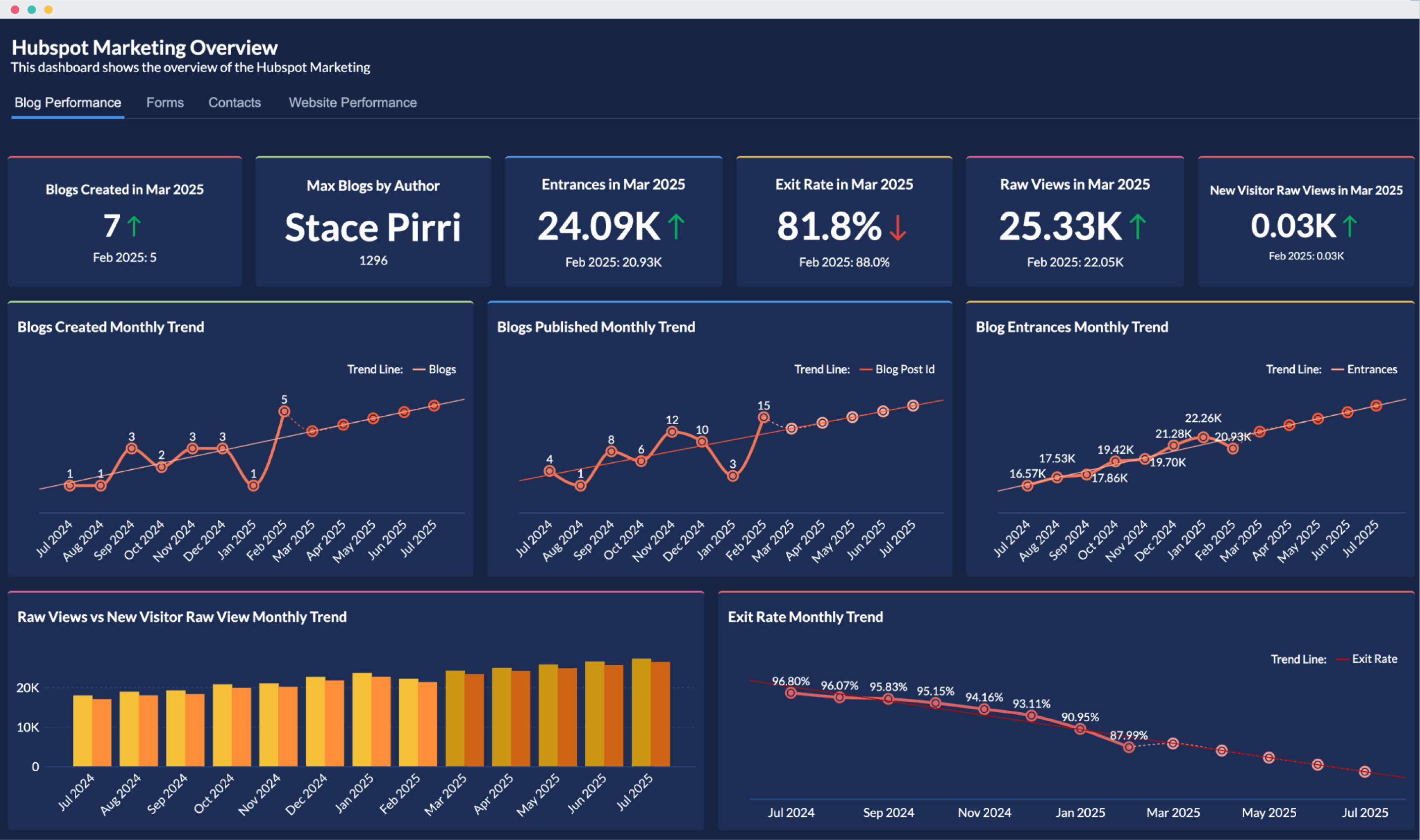
HubSpot: Reporting inside the CRM
HubSpot keeps reporting close to the workflows where sales and marketing teams already operate. Users can build reports across CRM and campaign data, measure attribution across multiple touchpoints, and track pipeline movement without exporting data into another system. Because reporting is tied closely to the rest of the product, the analytics becomes more useful as teams adopt more HubSpot modules.
Stripe: Financial reporting inside the dashboard
Stripe includes financial reporting directly in the product dashboard. Users can monitor metrics such as MRR, churn, retention, payouts, and disputes without moving data into a separate BI workflow. Stripe focuses on business metrics instead of exposing raw transaction tables first. For SaaS teams and operators, that usually means less time spent assembling reports before making decisions.

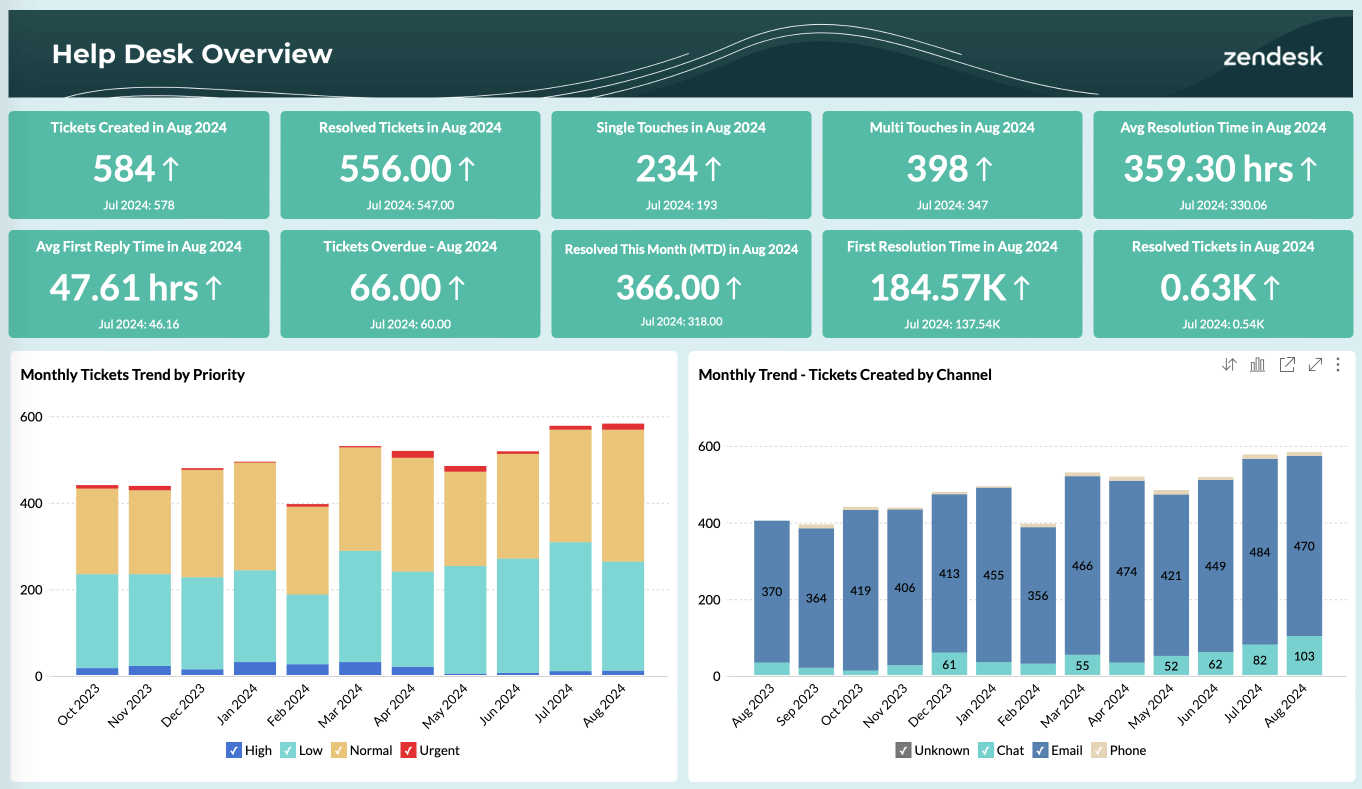
Zendesk: Support reporting inside operations
Zendesk brings reporting into the support environment through Zendesk Explore. Support teams can track CSAT, SLA performance, ticket volume, and agent workload while working in the same environment used to manage customer requests. Managers can review performance and adjust staffing without switching tools or waiting for scheduled reports.
Top Embedded Analytics Platforms for SaaS
Choosing a platform depends less on feature checklists and more on constraints: how much customization you need, who owns implementation, how data is stored, and what level of control your product requires. Here are a few commonly evaluated options.
Zoho Analytics
Zoho Analytics includes the pieces most SaaS teams usually look for in embedded analytics: white-labeling, multi-tenant support, APIs, SDKs, natural-language querying through Zia, and a large connector library. The platform works well for teams that want embedded reporting without building and maintaining an analytics stack internally.
Sisense
Sisense is often considered by teams dealing with larger data volumes or more complex reporting requirements. The platform gives engineering teams more control over how analytics is modeled and delivered, but implementation and maintenance can require more involvement than lighter embedded options.
Logi Analytics
Logi Analytics is typically chosen when UI flexibility is a higher priority. Teams can shape analytics more tightly around their product experience, though setup and ongoing ownership tend to require more development effort.
How to compare platforms
Instead of comparing feature counts, compare operational fit:
- Time to implementation
- Tenant and permission controls
- API coverage
- Customization limits
- Pricing at higher usage levels
- Maintenance expectations
A platform that checks every feature box but adds operational overhead usually becomes harder to justify after launch.
Embedded Analytics Software for SaaS: Zoho Analytics
Zoho Analytics is an embedded BI platform that SaaS teams can add inside their applications instead of building reporting infrastructure themselves. The platform includes reporting, dashboards, data access controls, APIs, and embedding options that support customer-facing analytics use cases. Here are the capabilities that matter most for embedded scenarios.
White-labeling
Teams can match analytics with the rest of the product experience. That includes branding elements such as logos, colors, typography, and dashboard styling so reporting appears inside the existing application experience rather than as a separate tool.
Access control
Embedded analytics usually needs different levels of visibility for different users. Zoho Analytics supports role-based access and data restrictions so teams can control who can view reports, edit content, or access underlying datasets. For SaaS products, this also helps manage access across customers and internal teams.
Interactive reporting
Users can work with reports instead of viewing static dashboards. Common interactions include:
- Filtering data
- Drilling into records
- Adjusting date ranges
- Changing views
- Exploring details from summary metrics
These capabilities support reporting workflows directly inside the application.
AI-assisted analysis
Zoho Analytics includes Zia, its analytics assistant. Users can ask questions in plain language and generate reports without writing queries manually. The platform also supports generated summaries, chart suggestions, and analysis workflows that reduce manual report creation for common use cases.
APIs and developer tooling
Embedding analytics usually requires programmatic setup and administration. Zoho Analytics provides APIs and SDKs for:
- Provisioning
- Permissions
- Embedding
- Data source management
- User administration
That gives engineering teams a way to automate onboarding and manage analytics as part of the product lifecycle.
Embedded Analytics for SaaS FAQs
What is embedded analytics for SaaS?
Embedded analytics for SaaS means placing reports, dashboards, and analytical capabilities directly inside a SaaS application. Customers can examine their data within the product they already use instead of exporting it to a separate BI environment. Depending on the implementation, users may also be able to filter data, drill into results, build reports, or ask questions without leaving the application.
Should you build or buy embedded analytics?
The decision depends on how strategically unique the analytics layer is to your product and how much infrastructure your engineering team wants to own. Building can make sense when the analytical experience is central to the product and requires behavior that available platforms cannot provide. It also means owning development and ongoing maintenance of areas such as data access, visualization, permissions, exports, and performance. Buying gives you an existing analytics layer to integrate and customize. The trade-off is accepting the vendor’s architecture, licensing model, and customization boundaries. Compare both approaches over several years rather than using initial development cost alone.
How much does embedded analytics cost?
There is no useful universal price because vendors license embedded analytics in different ways. Pricing may depend on users, tenants, usage, capacity, infrastructure, or the features included in the deployment. Total cost also extends beyond the licence. Include implementation, data integration, customization, administration, support, and the engineering work required to maintain the integration. For an in-house build, account for both initial development and the ongoing cost of operating the analytics layer.
How long does it take to implement embedded analytics?
Implementation time depends on the scope of the experience being embedded. A straightforward dashboard integration may require considerably less work than a fully white-labeled, multi-tenant deployment with custom authentication and provisioning. Estimate the project against your own requirements rather than a generic industry timeline. Data preparation, security design, tenant architecture, UI customization, testing, and internal approval processes can all affect the release date. A proof of concept using your actual application and data is a better indicator of implementation effort than a vendor demo.
How do you keep tenant data isolated in a multi-tenant setup?
ITenant isolation should be enforced in the data-access architecture rather than relying only on filters visible in the interface. Each authenticated user should be mapped to the appropriate tenant and permissions before a query is executed. Test isolation across every route through which data can leave the analytics layer, including dashboards, drill-downs, downloads, scheduled reports, and APIs. The exact architecture will depend on how your application stores and separates customer data.
How do you keep tenant data isolated in a multi-tenant setup?
ITenant isolation should be enforced in the data-access architecture rather than relying only on filters visible in the interface. Each authenticated user should be mapped to the appropriate tenant and permissions before a query is executed. Test isolation across every route through which data can leave the analytics layer, including dashboards, drill-downs, downloads, scheduled reports, and APIs. The exact architecture will depend on how your application stores and separates customer data.
Does embedded analytics support SSO?
Many embedded analytics products support SSO so users can access analytics through the identity already established in the host application. The exact method varies by platform and architecture and may involve standards or token-based approaches such as SAML, OAuth, or JWT. During evaluation, verify both authentication and authorization. A seamless login is only part of the requirement; the analytics layer also needs to apply the correct permissions after the user's identity has been established.
What security and compliance standards should embedded analytics meet?
Requirements depend on your industry, customers, deployment architecture, and the data being analyzed. At minimum, evaluate how the platform handles access control, encryption, auditing, data retention, and tenant separation. Then map the vendor’s current certifications and contractual commitments to your own compliance obligations. Depending on the use case, procurement teams may ask about frameworks or regulations such as SOC 2, GDPR, or HIPAA. Certification names should be verified against the vendor’s current compliance documentation rather than assumed from general product claims.
What AI capabilities should you expect from embedded analytics?
AI features increasingly extend beyond generating charts from natural-language questions. Depending on the platform, users may be able to ask questions conversationally, receive explanations of changes in business metrics, detect unusual patterns, or use predictive capabilities without leaving the host application. The more important evaluation question is how those outputs are grounded. Check whether the AI works with governed business definitions and respects the same permissions applied elsewhere in the analytics environment. Zoho Analytics provides conversational and automated analysis capabilities through Zia.
What is the best way to deliver embedded dashboards inside a customer portal?
Use your analytics platform’s native embedding capabilities so reporting can operate within the portal and follow its existing authentication and access rules. Depending on the experience you need, you can embed a complete dashboard or place individual analytics components within a page. For more customized experiences, APIs can give developers greater control over how analytics is presented. User identity should pass securely from the host application, with tenant-level controls ensuring that each customer can access only their own data. Zoho Analytics supports dashboard and component embedding, with secure embed tokens available through its Embed API
We want a white-label dashboard solution to embed inside our app. What should we consider
Start with how much control you need over the customer experience. Check whether the platform lets you apply your own branding, remove vendor branding, and control how analytics appears within your application. Then examine authentication and tenant provisioning, particularly if customers need different permissions or configurations. Pricing should also be modeled at your expected customer and usage levels. A white-label BI setup should make the reporting experience feel consistent with the rest of your product.
What are the best embedded analytics vendors for B2B SaaS companies?
There is no single best platform for every B2B SaaS product. The choice depends on the analytics experience you want to deliver, your architecture, expected usage, and the amount of development work your team wants to own. Zoho Analytics is an option for teams looking for white-labeling, multi-tenant analytics, developer APIs, and natural-language analysis within the same platform. Sisense is another established embedded analytics vendor, while Logi Analytics focuses heavily on analytics integrated into software applications. During evaluation, test each platform against your own tenant model, permissions, data volumes, and expected usage rather than comparing feature counts alone.
Which customer-facing analytics tools can be embedded into a SaaS platform?
Customer-facing analytics platforms should support secure embedding within a multi-tenant product. The important question is whether authentication, data permissions, and tenant separation continue to work after analytics is placed inside your application. Also consider how much control developers have over the experience. Some products need complete dashboards, while others need individual charts or more customized analytics interfaces. Zoho Analytics supports customer-facing embedding and access controls designed to restrict users to the data available to them.
Which customer-facing analytics tools offer enterprise-grade security?
Start with the security and compliance requirements your own customers expect you to meet. Verify how a vendor handles authentication, authorization, encryption, auditing, and tenant separation, then check which certifications apply to the service and deployment you plan to use. For regulated deployments, requirements may also include data residency or industry-specific controls. Zoho Analytics provides role-based and data-level access controls, SSO, and additional security and governance capabilities. Verify individual certifications and compliance requirements against Zoho’s current documentation before procurement.
What are the best platforms for embedded analytics and reporting integrations?
Start with the data your customer-facing reports need. A suitable platform should connect to the databases, warehouses, business applications, files, or APIs involved in your product and provide a manageable way to provision those sources as customers are added. Also examine how the platform handles data modeling and refresh requirements. For multi-tenant products, provisioning and permissions should be automatable rather than requiring administrators to configure every customer manually. Zoho Analytics provides native connectors alongside APIs that can be used to manage embedded analytics deployments programmatically.
What are the best embedded dashboard tools for developers?
For developers, the quality of the integration surface matters as much as the dashboard builder. Check whether APIs or SDKs cover the operations your application needs, including user and workspace provisioning, permissions, embedding, and data management. Authentication should also fit your existing identity model, and the documentation should be detailed enough to test common workflows before purchase. Zoho Analytics provides REST APIs and developer resources for integrating and managing analytics within applications.