In this lesson we will learn about:
- Creating and adding articles
- Formatting articles
- Defining content hierarchies and navigation
- Search engine optimization and generative engine optimization
- Publishing the article in Help Center
- Setting article level visibility and permission
The knowledge base is versatile. It can consist of different types of content, such as product guides, release notes, product roadmap, FAQs, handbook etc.
Each article has a unique structure or layout which determines the flow of the content. A structured content is easy to follow, its predictable, and quick to navigate.
A great article isn't just a wall of text; it’s a searchable, easy-to-digest solution that delivers targeted information for LLMs and humans.
As a rule of thumb, an article should:
- Have clear descriptive titles
- Be written in simple language
- Use sections highlighted with clear headings, contain visual aids, and offer step-by-step instructions on how to perform an action.
Tip: Read Best practices for creating AI friendly content for detailed guidance.
Creating articles with and without templates
KB articles can be created from scratch or by using predefined templates.
In the Knowledge Base module, click Add article.

The below image shows the elements that need to be added for every article such as tags, description, article title (which generates the permalink or URL) etc. The Noindex and Nofollow options restricts indexing of the article by search engines.
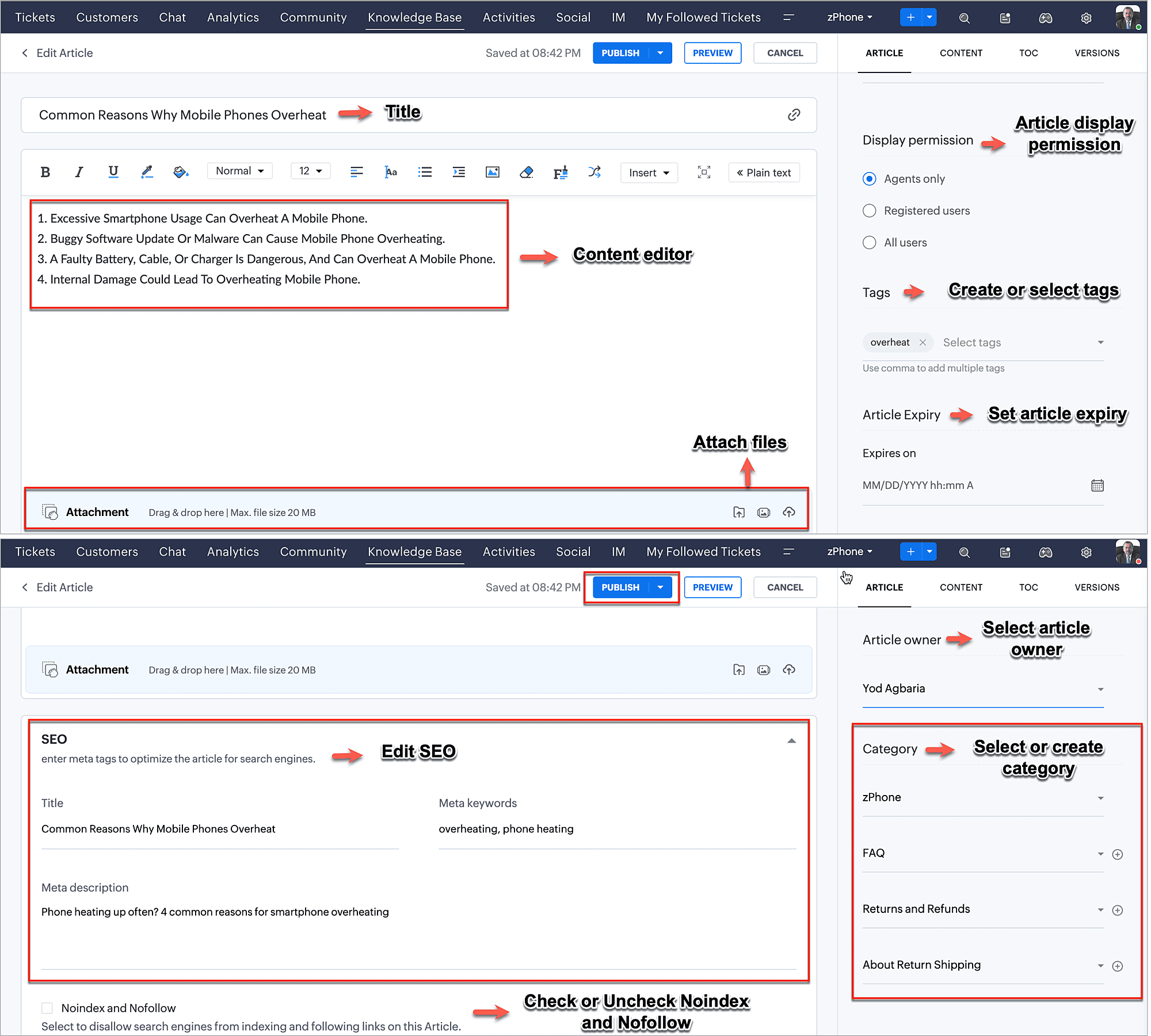
Some organizations may find it challenging to maintain visual, language, tone as well as brand consistency when multiple content creators are responsible for publishing different types of articles. Templates provide a predefined style guide to the writers and also helps new employees avoid inconsistencies in their project.
A template can define the headings, paragraph styles, tables, images, videos, accordions, and tabs at respective positions letting the organization maintain visual consistency.
Formatting an article
Zoho Desk’s built-in WYSIWYG ("What You See Is What You Get") content editor allows businesses to create quickly and edit their knowledge base articles to a preferred style. The simple interface provides basic and advanced formatting options along with HTML editing functionalities that are essential for most authors to control the content style and format.
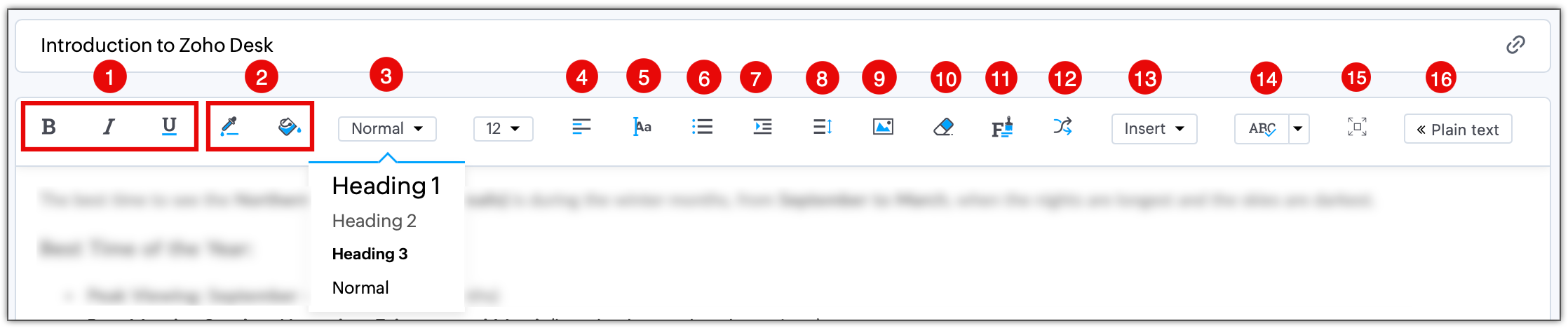
The common rich text formatting options available are:
- Font style - Bold, Italics, Underline
- Font and background coloring
- Heading - Normal text, Heading 1, Heading 2 and so on applicable for creating a TOC in the article. Click the TOC tab from the right panel to view the TOC structure.
- Text alignment - Left, right, justify, or center.
- Text direction - Left to right or right to left.
- Numbered and bulleted lists
- Increase or decrease the indent of a text.
- Line Spacing - 1.0 (Single), 1.2 (Normal), 1.5, and 2.0 (Double)
- Insert image from the desktop, gallery, or URL.
- Clearing existing formatting of the text.
- Format painter - Copy the style or formatting of the text on a new text.
- Insert article as link within an article and set whether the article can be accessed by the agent or users.
- Insert links (an URL or email address), remove links, embed video, insert tab or accordion, insert HTML (article content can be entered in HTML format), insert table, insert horizontal rule, and more.
Using the Insert HTML option, you can customize or format even the background color of a text.
Content layering and cleaner UI with accordions and tabs
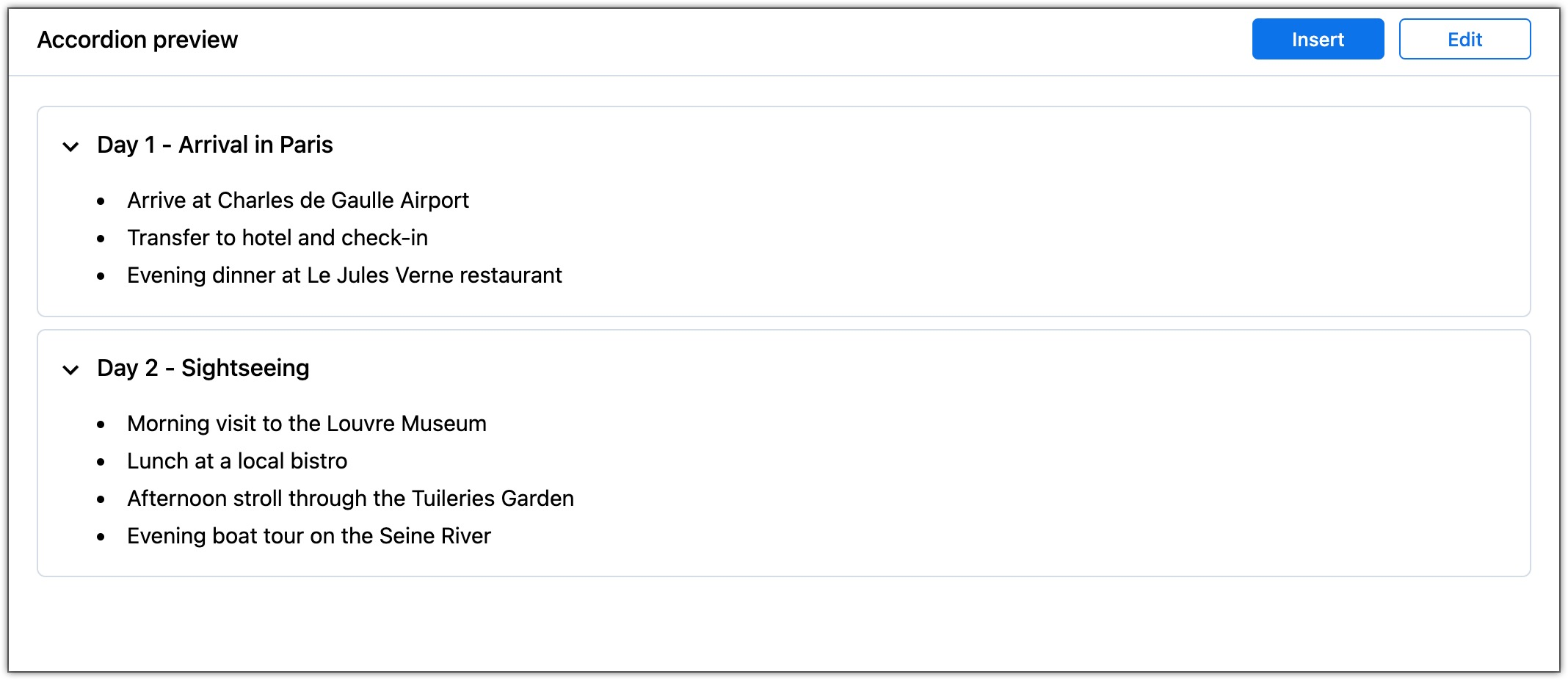
Accordion UIs save space, improve focus, enhance navigation, and content usability. They provide a high-level overview of the displayed elements, so that the interested users can scroll by and focus on the information most relevant to them. Common examples are onboarding flows, brochures, testimonials etc.
When to use an accordion?
- When you think users don’t need all the content at once.
- When the information can be divided into logical sections for easy consumption.
- When saving space is crucial, especially on mobile and for long form articles where distributing the content into multiple articles might break the flow.
- On FAQ pages where frequently asked questions and answers are organized for easy navigation.
When to avoid using an accordion?
- If users frequently access all sections and need the information before starting their job its best to show everything at once.
- Hiding content makes navigation harder instead of easier.
- Excessive clicking slows users down rather than helping them scan quickly.
A Card view or a List view stacks the content logically to retain the flow while progressively displaying what is needed.
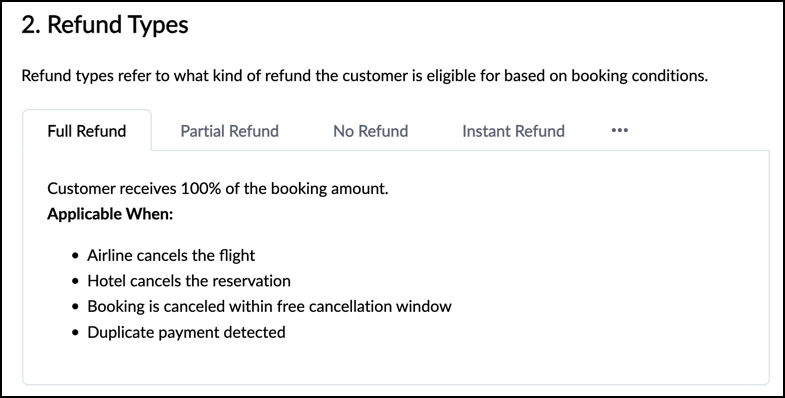
Nested tabs are often used on pricing pages, settings menus, dashboards etc. It's used to organize large amounts of information by grouping sub-categories under primary tabs. This primarily prevents overwhelming the user with a lot of content while avoiding the need to navigate to separate pages.
Content hierarchy and navigation
When people see an article they scan it for relevant information they don't read every word, which is why a clear content hierarchy is essential. Hierarchy provides a structured arrangement to the information that is organized from most to least important. It guides users, search engines, and LLMs through your content making it adaptable and discoverable. On-page content hierarchy involves structuring information on a single page using headings (H1 to H6), paragraphs, lists, and visuals to ensure a clear and logical progression.
H1: Main Topic | H2: Primary Subtopics | H3: Supporting Details | H4: Granular Information

Building an effective hierarchy includes paying attention to several key components that are interlinked.
A) Following an inverted pyramid structure where the content progressively advances or discloses details. It puts the most critical information at the top of the page. By answering the main question first, followed by supporting details, examples, and context you mirror how people consume digital content. This approach ensures visitors get value immediately.
B) Consistent use of HTML tags ensure an article has at least one H1 that describes the main topic, H2s break content into major sections, while H3s divide those sections into subtopics. Avoid jumping from H2 to H4 as it confuses both readers and search engines.
C) Building a logical flow acts as a roadmap. Each section naturally lead to the next, building on previous information carefully guiding the readers, so that after finish one section they would know what information the next section holds.
D) Strategic internal linking within the hierarchy strengthens SEO signals as readers discover related content naturally. It reduces confusion and allows readers to easily navigate to the relevant sections without searching.
E) Visual cues such as diagrams, flowcharts or formatting using bullets, text highlights, white space and media like videos, GIFs etc. add a lot of value to the content. They emphasize a specific section and direct readers' attention to important points.
Common mistakes to avoid:
- Excessive use of keywords in the tags.
- Skipping between headings from H2 to H5 and so on.
- Using multiple H1 tags in single article.
- Too many nested flows that can over complicate the reading experience.
Search engine optimization and generative engine optimization
GEO is built over the traditional SEO. SEO establishes a solid base through accurate and authentic content, which GEO then leverages to select the most relevant pages and generate responses. The core principles behind effective SEO still apply to GEO. For example, authoritative, well-structured, easy-to-interpret articles are most referenced by the AI tools.
In order to build a knowledge base that is optimized for both the tools you need a coordinated effort in the following areas:
A) Content strategy: Quality and credibility of the content makes it trustworthy. Including lived experience from employees, giving examples of personal encounters, taking a leaf from a witness observation adds originality to the content.
B) EEAT signals: GEOs operate upon these principles Experience, Expertise, Authoritativeness, and Trust and they rank a content credible based on the EEAT score. Therefore, publishing original content that adds newness and provides unique perspectives is more likely to be picked and referred to by the AI tools.
C) Brand presence: Publishing content that AI tools can easily discover, understand and extract answers from on various platforms specially where customers engage the most (social media) makes it easier for AI tools to pull information.
D) Technical optimization: Ensuring AI crawlers can access and process the content readily.
Setting article level visibility and permission
Once an article is ready to be published its accessibility is determined by the visibility parameters. In the previous lesson where you learnt about setting up the knowledge base, we discussed how permissions are set for categories: Open or None, Public, Agents, Custom IP, and User groups.
Depending on the category visibility the options to display an article to agents only, registered users, groups or all users will be displayed. Ensure right articles are added under the right folders and subfolders.